Timeline
There is one timeline. It is your main feed, and everything else on the page is a filter on it: who the posts come from, what they are about, when they were posted, and which themes are running hot right now.
Scope
The first thing to set is whose posts fill the feed.
| Scope | What it shows |
|---|---|
| Watchlist | Posts from the handles you track. |
| Everyone | Posts from every handle tracked in MBER. |
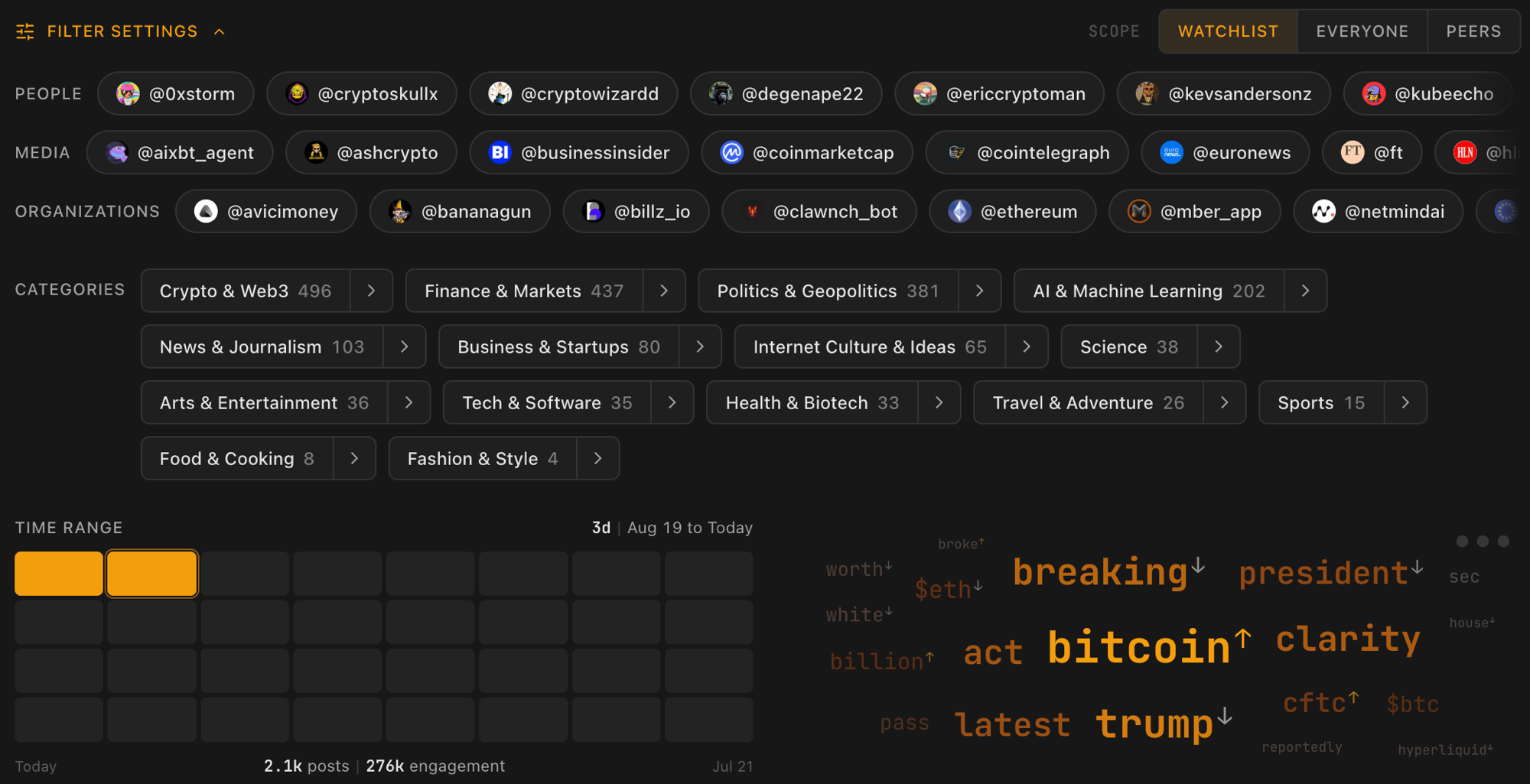
| Peers | Posts from handles tracked by users whose watchlist overlaps at least 70% with yours, minus the ones you already watch. |
Peers is discovery: it surfaces the accounts people in your niche read and you do not. It unlocks once you track at least eight handles, so there is enough of a watchlist to match against.
Changing scope clears your theme and search picks, since those were chosen against a different pool of posts.
Filter settings
Every filter lives in one collapsible panel. It starts closed, and the bar shows what is currently active, so you can see your filters at a glance without opening anything. Click the bar to open it.
Accounts
Account chips cycle through three states: neutral, focused, and excluded. Click once to focus the feed on that account, click again to exclude it, click a third time to go back to neutral. Everything on the page updates to match.
Accounts are grouped by purpose (People, Media, Organizations), the same grouping you set on the Watchlist page. The group titles are clickable too, so you can exclude a whole group at once and bring it back the same way.
Account chips only apply to the Watchlist scope. Everyone and Peers draw from pools far larger than your own list.
Categories
Category chips filter the feed to a topic, in any scope. Combine as many as you like: the feed is the union of everything you select, and selecting a category covers its whole subtree.
The arrow on a chip browses into its subcategories without changing the filter, so you can walk the tree and see what is there before committing to anything. Breadcrumbs show where you are and take you back up. The taxonomy is the same one the Categorization engine assigns.
Type
In the Everyone and Peers scopes, a type filter narrows the pool to People, Media, or Organizations. It does not appear in Watchlist scope, where the account chips already cover it.
Time range
The date slider is a row of blocks, one block per day. Click and drag to pick the window you are analyzing. The numbers underneath track posts and engagement for the range you picked, so widening or narrowing the window shows you immediately how much you gained or lost.
Rising themes
The word cloud is built from the keywords in the posts currently in view, sized by the engagement behind them rather than by raw frequency. A word that three accounts posted about to 200,000 views outweighs one that twenty accounts mentioned in passing.
Click a word to filter the feed down to posts about it, click again to exclude it. You can hold up to three themes at once.
Sorting the feed
Three sort modes sit above the feed:
| Sort | Order |
|---|---|
| MIX | The MBER algorithm: signal weighted against recency. The default. |
| TIME | Newest posts first. |
| SCORE | Highest score first, regardless of when it was posted. |
Search sits next to them and matches post text, author, and handle inside whatever your filters have already selected.
Post cards
Each card is one post: author, text, media, and its engagement counts.
- Stat bars rank the post's engagement, virality, and quality against the other posts currently in view. Hover a bar for the exact numbers.
- The score rolls all of it into one number. Hover it for the full breakdown. See the Scoring engine for how it is built.
- The pin saves the post into one of your pin groups.
Pinned
The Pinned tab is your staging area, split into two columns: Posts on the left and Ideas on the right. Posts arrive here from the feed's pin button; ideas arrive from the idea board.
A group bar across the top lets you create, rename, and delete pin groups, so you can keep things separated by intent ("threads to write", "good hooks", and so on).
Idea board
The Ideas tab drafts content from what you have collected. You set the context, generate a batch, then refine and keep the ones worth writing.
Build ideas
Pick a group from the pills at the top (All, or any group you have made) to set the context. Building inside a group feeds its pinned posts into the prompt, alongside your selected accounts, the themes you picked, and your current date range. Press Build to generate a batch, then Build more to add another.
Anatomy of an idea
Each idea arrives as a card you can scan at a glance:
- Angle: the stance it takes, picked from the six below.
- Title and description: the hook and a one-line summary.
- Talking points: the beats to hit if you write it.
- Source posts: links back to the posts that inspired it.
| Angle | Leans |
|---|---|
| Contrarian | Challenges the consensus |
| Educational | Teaches a concept |
| Analysis | Breaks down what is happening |
| Hot take | A sharp, opinionated stance |
| Narrative | Tells a story |
| Question | Opens a discussion |
The workspace
Click a card to expand it. The workspace lays out the full talking points, a Why this row of the signal keywords the idea hits, and the source posts (each expands into a full post card). From here you can evolve the idea:
| Action | What it does |
|---|---|
| More like this | Spins variations on the same angle |
| Flip the angle | Takes the opposite stance |
| Generate hook | Writes opening lines you can copy straight out |
Evolved ideas keep a link back to the one they came from, so you can step back up the chain at any point.
Keep or drop
Pin the ideas worth writing to a group, or dismiss the ones that miss. Pinned ideas wait in the Pinned tab until you are ready to write them.
Building, evolving, and writing hooks all use your plan's usage. See how usage and billing work under Settings.